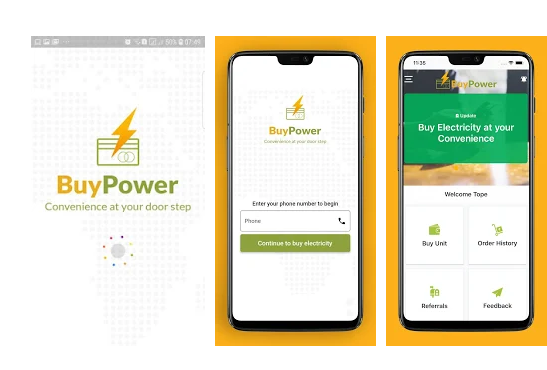
Actions are now moving from offline to online. Many things however, including the purchase of electricity are now being carried out online in Nigeria. Buypower.ng is a presentable online platform on which you can buy electricity in Nigeria.
Therefore if you have been wondering how you can grab the power of the internet while you enjoy the comfort of your home with good power supply, then you have met the right article. In this post, we have given all you will need to know about how to purchase electricity online in Nigeria with buypower.ng.
Read on as i show you step by step the procedure to recharge your prepaid meters in Nigeria.
WHAT IS BUYPOWER?
Yet on the surface, struggling to grab what buypower actually is? Well, Buypower is an online utility payment platform in Nigeria. Through it, Nigerians under the Abuja Electricity Distribution Company, Jos Electricity Distribution Company PLC, Ikeja Electric, Kano Electricity Distribution Company, Port Harcourt Electricity Distribution Company, EKEDC, IBEDC, Kallak Power, and the Kaduna Electric can purchase or recharge their pre-paid electricity services.
With the prepaid meters taking over in Nigeria today, companies like Buypower has sprout to ensure that Nigerian subscribe their meters without having to queue in line for hours. Among the many companies or platforms on which you can purchase electricity services in Nigeria, Buypower is one of the most successful.
The reason to that may not be far-fetched as they are notably good at what they do. And for that reason, we have given you this guide, to help you access their services swiftly.
BUYING ELECTRICITY ONLINE WITH BUYPOWER.NG
The primary thing you will do on the Buypower platform is to purchase electricity, but how can you do that? Before we delve into how you can purchase electricity on Buypower, let us first look at what you need to get started.
WHAT DO YOU NEED TO GET STARTED WITH BUYPOWER.NG
You must have the following ready before you get started with the Buypower platform:
A Smartphone (iOS or Android) with which you can access the internet.
Good internet connection which could be mobile data or WiFi
A prepaid meter number
A debit card. Although there other payment methods which will not require a debit card.
The BuyPower mobile app.
When you have gotten these ready, the next step to register with the BuyPower Company as a user.
HOW TO REGISTER/CREATE ACCOUNT WITH BUYPOWER
You must be registered in order to have the purchasing power via BuyPower. Registration does not take anything but just few minutes.
On the Buypower home page (buypower.ng), enter your phone number
Click the button that says “Click here to buy electricity” when you have entered your phone number
On the signup page that will be displayed afterwards, enter your name, email address and create a strong password that you will be able to remember.
Your login details will be saved so that you will be able to easily login next time you want to purchase electricity via the platform.
You can also perform this same line of action via the Buypower mobile app, which is available on both iOS and Android devices. You can download the app from the app store of your device.
HOW TO LOGIN TO YOUR BUYPOWER ACCOUNT
When you have created your account, the next thing is to login and purchase the electricity you want.
Visit the buypower.ng/login
Enter your phone number, which you registered with
Enter your password afterwards and click the “Login to your account” button below
HOW TO BUY ELEECTRICITY ON BUYPOWER.NG
To buy electricity plan on the Buypower platform, kindly follow the steps below:
Log on to buypower.ngor open the buypower app
Tap the login button and enter your login details as explained above
While on the homepage while you are logged in click the “Buy Unit” button. You will be taken to the order page on which you will make your request.
Select the location of the place you want to buy the electricity
Enter the amount you of electricity you want to buy
Select the payment method that is most convenient for you (debit card, bank transfer or USSD).
Click the “Continue to Payment Information” to slide to the next page
Click the “Pay” button on the following page
Enter your debit card details if you choose that method; or you can choose pay with bank to pay with USSD or by bank transfer.
After a successful payment, a token will be sent to the number which you registered with and in your mail.
On your prepaid meter, type in the token details and click the red or blue “Enter” button and the units purchases will be loaded immediately. That’s all!
The interesting thing about this is that it takes just 5 minutes, hence saving you a whole lot of stress and time.
NOTE: The token generated after payment is for a particular prepaid meter which its details were entered during the purchase. However, you cannot use a token on a meter different from the one it was vended for.
HOW TO RESET YOUR BUYPOWER ACCOUNT PASSWORD
Anyone can forget his password to accounts and the Buypower account is not an exception. In a case you lost or forgot the password to your Buypower account, you can follow the simple steps stated below to retrieve your account:
Enter the Buypower website (buypower.ng)
Tap the menu button and click the “Login” button
Just below “Login to your account” button is the “Forgot you password?” button.
Click the button and on the page it will take you, enter the phone number with which you registered.
A link through which you can reset your password will be forwarded to your phone. Follow the link to change your password.
DO YOU NEED MULTIPLE PHONE NUMBERS TO BUY ELECTRICITY FOR DIFFERENT METERS?
As I already stated that you cannot load a token into a meter different from the one it was created for. But in a case you want to purchase power for different meters, what will you do?
What you need to do is simple. Log on to your account and edit the previous meter number. Enter the meter number for which you want to vend. The top five meter numbers you used on your account will be saved and next time, you will only have to select from the list which you want. That does not stop you from entering a new meter number anyway.
In conclusion, I will want to state that it must have been great ride with you, from the start till now. I am certain you have got the complete guide to how you can purchase electricity online in Nigeria with Buypower.ng.
Feel free to leave your questions below; your inputs and suggestion will really help us to serve you better, so please, the comment section is all yours. Share this if you feel it will help a fellow.